 kiit-codes
A Kotlin library for classifying and handling success and failure.
A small, dependency-free status and error taxonomy for application outcomes, with extensible codes, protocol mappings, validation, typed exceptions, and RFC 9457 problem details.
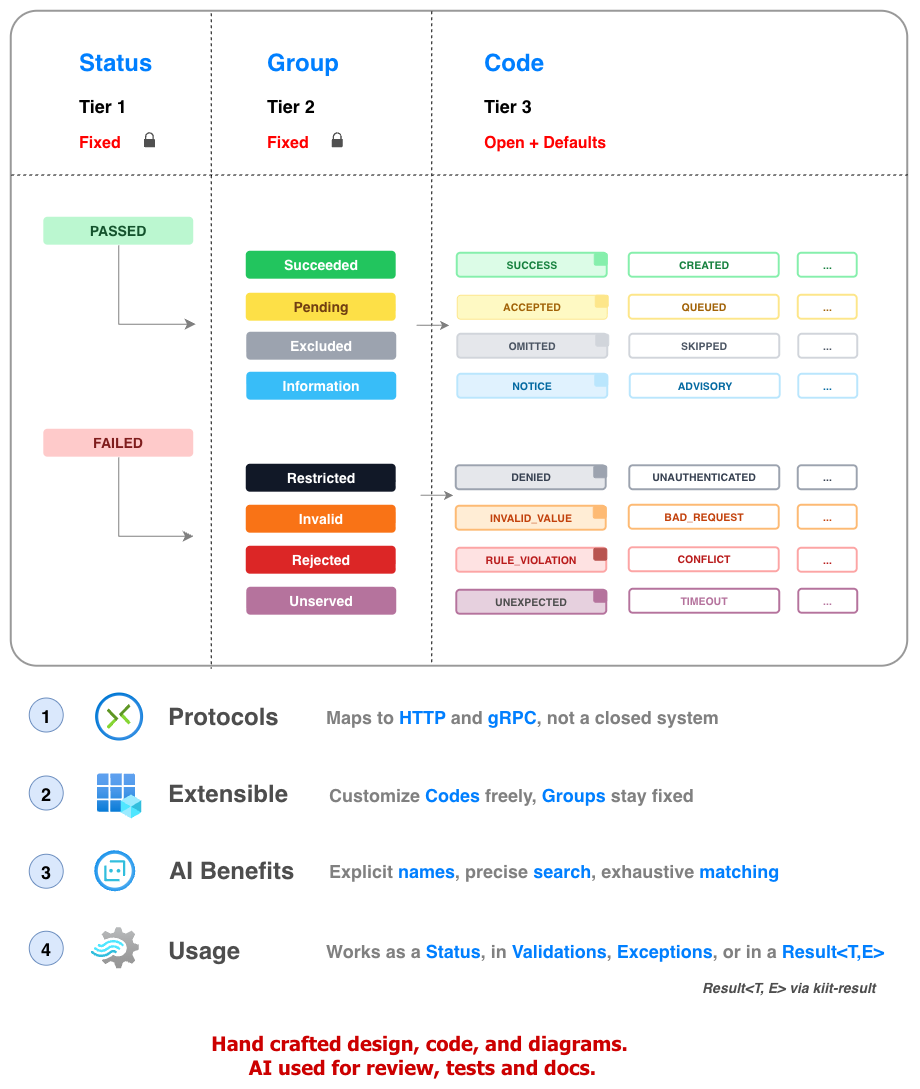
Overview
Goals
General-purpose status codes. Like HTTP status codes, but not tied to HTTP or a specific protocol. A three-tier status taxonomy (Status → Group → Code) for any layer of your app, with built-in RFC 9457 Problem Details output.
This is how a code is constructed: a name, a title, an origin that says who owns it, and an optional scope inside that origin.
- Kotlin
- Java
- TypeScript
- Swift
val MISSING_DATE = Invalid(
    name = "MISSING_DATE",
    title = "Date not supplied",
    origin = "samples.kiit.dev",
    scope = "tasks",
)
Failed.Invalid MISSING_DATE = new Failed.Invalid(
    "MISSING_DATE",
    "Date not supplied",
    "samples.kiit.dev",
    "tasks");
const MISSING_DATE: Invalid = Invalid(
  "MISSING_DATE",
  "Date not supplied",
  "samples.kiit.dev",
  "tasks",
);
let MISSING_DATE = Failed.Invalid(
    name: "MISSING_DATE",
    title: "Date not supplied",
    origin: "samples.kiit.dev",
    scope: "tasks"
)
- HTTP and gRPC: The eight groups were validated against their status codes, not derived from them.
- RFC 9457: The problem details format shaped how a status becomes a response body.
Languages
| # | Target | Role | Status | Notes |
|---|---|---|---|---|
| 1 | Kotlin | Original | Live | Canonical model, in production use for years. |
| 2 | TypeScript | Native port | Beta | Same model, written in TypeScript. |
| 3 | Swift | Multiplatform | POC | XCFramework through SKIE. |
License
Refer to the LICENSE file in the repository.
Setup
Install
- Kotlin
- Java
- TypeScript
dependencies {
    implementation("dev.kiit:kiit-codes:1.2.0")
}
<dependency>
    <groupId>dev.kiit</groupId>
    <artifactId>kiit-codes</artifactId>
    <version>1.2.0</version>
</dependency>
dependencies {
    implementation 'dev.kiit:kiit-codes:1.2.0'
}
npm install @kiitdev/codes
| # | Language | Artifact | Registry |
|---|---|---|---|
| 1 | Kotlin, Java | dev.kiit:kiit-codes | Maven Central |
| 2 | TypeScript | @kiitdev/codes | npm |
| 3 | Swift | KiitCodes | Swift Package Manager, link to come |
Imports
- Kotlin
- Java
- TypeScript
- Swift
import kiit.codes.*
import kiit.codes.formats.*
import kiit.codes.*;
import kiit.codes.formats.*;
import { Succeeded, Restricted } from "@kiitdev/codes";
import type { Status } from "@kiitdev/codes";
import KiitCodes
- Node: 22.13 or later.
- Modules: One ESM build that works from both
importandrequire().require()loads the ES module directly, with no flag or warning from Node 22.13. - Jest: A project on Jest's default CommonJS setup may need
transformIgnorePatternschanged to let Jest handle the package.
Sources
| # | Link | Details |
|---|---|---|
| 1 | Repository | github.com/kiitdev/kiit-codes |
| 2 | Kotlin source | kiit-codes/src/commonMain/kotlin |
| 3 | TypeScript port | ports/kiit-codes-ts |
| 4 | Sample apps | samples |
Tutorial
A to-do list, one quick win at a time. Each step builds on the last.
Return a status
Return a Status instead of throwing for a failure you expect:
- Kotlin
- Java
- TypeScript
- Swift
// A failure you expect is a value, not an exception
fun validate(title: String): Status {
    return if (title.isBlank()) {
        Invalid.INVALID_VALUE
    } else {
        Succeeded.SUCCESS
    }
}

val good = validate("buy milk")
// success = true, group = Succeeded, name = SUCCESS
println("success = ${good.success}, group = ${good.group}, name = ${good.name}")

val bad = validate("")
// success = false, group = Invalid, name = INVALID_VALUE
println("success = ${bad.success}, group = ${bad.group}, name = ${bad.name}")
// A failure you expect is a value, not an exception
Function<String, Status> validate = title -> {
    if (title.isBlank()) {
        return Failed.Invalid.INVALID_VALUE;
    }
    return Passed.Succeeded.SUCCESS;
};

Status good = validate.apply("buy milk");
// success = true, group = Succeeded, name = SUCCESS
System.out.println("success = " + good.getSuccess() + ", group = " + good.getGroup() + ", name = " + good.getName());

Status bad = validate.apply("");
// success = false, group = Invalid, name = INVALID_VALUE
System.out.println("success = " + bad.getSuccess() + ", group = " + bad.getGroup() + ", name = " + bad.getName());
// A failure you expect is a value, not an exception
function validate(title: string): Status {
  if (title.trim() === "") {
    return Invalid.INVALID_VALUE;
  }
  return Succeeded.SUCCESS;
}

const good = validate("buy milk");
// success = true, group = Succeeded, name = SUCCESS
console.log(`success = ${good.success}, group = ${good.group}, name = ${good.name}`);

const bad = validate("");
// success = false, group = Invalid, name = INVALID_VALUE
console.log(`success = ${bad.success}, group = ${bad.group}, name = ${bad.name}`);
// A failure you expect is a value, not an exception
func validate(_ title: String) -> Status {
    if title.trimmingCharacters(in: .whitespaces).isEmpty {
        return Failed.Invalid.companion.INVALID_VALUE
    }
    return Passed.Succeeded.companion.SUCCESS
}

let good = validate("buy milk")
// success = true, group = Succeeded, name = SUCCESS
print("success = \(good.success), group = \(good.group), name = \(good.name)")

let bad = validate("")
// success = false, group = Invalid, name = INVALID_VALUE
print("success = \(bad.success), group = \(bad.group), name = \(bad.name)")
Validate and Match
Return a Checked to carry the status and the errors together, then match on whether it passed or failed:
- Kotlin
- Java
- TypeScript
- Swift
// Checked carries the status and the errors together
fun validate(title: String): Checked =
    if (title.isNotBlank()) {
        Checked.success()
    } else {
        Checked.failure(
            Invalid.INVALID_VALUE,
            listOf(
                Err.on("title", title, "must not be blank"),
            ),
        )
    }

val checked = validate("")
// failed: INVALID_VALUE
when (val status = checked.status) {
    is Passed -> println("ok: ${status.name}")
    is Failed -> println("failed: ${status.name}")
}
// Checked carries the status and the errors together
Function<String, Checked> validate = title -> {
    if (!title.isBlank()) {
        return Checked.success();
    }
    return Checked.failure(Failed.Invalid.INVALID_VALUE, List.of(Err.on("title", title, "must not be blank")));
};

Checked checked = validate.apply("");
// failed: INVALID_VALUE
switch (checked.getStatus()) {
    case Passed passed -> System.out.println("ok: " + passed.getName());
    case Failed failed -> System.out.println("failed: " + failed.getName());
}
// Checked carries the status and the errors together
function validate(title: string): Checked {
  if (title.trim() !== "") {
    return Checked.success();
  }
  return Checked.failure(Invalid.INVALID_VALUE, [Err.on("title", title, "must not be blank")]);
}

const checked = validate("");
// failed: INVALID_VALUE
if (checked.status.success) {
  console.log(`ok: ${checked.status.name}`);
} else {
  console.log(`failed: ${checked.status.name}`);
}
// Checked carries the status and the errors together
func validate(_ title: String) -> Checked {
    if !title.trimmingCharacters(in: .whitespaces).isEmpty {
        return Checked.companion.success(status: Passed.Succeeded.companion.SUCCESS)
    }
    return Checked.companion.failure(
        status: Failed.Invalid.companion.INVALID_VALUE,
        errors: [Err.companion.on(field: "title", value: title, message: "must not be blank", ex: nil)]
    )
}

let checked = validate("")
// failed: INVALID_VALUE
switch onEnum(of: checked.status) {
case .passed(let passed):
    print("ok: \(passed.name)")
case .failed(let failed):
    print("failed: \(failed.name)")
}
- By group: Branch on
Restricted,Invalid,RejectedorUnservedinsideFailed. - By code: Branch on one specific code, such as
Rejected.CONFLICT, before the broader branches. - More: See Status: Pattern matching.
See Errors for the types.
Build an RFC 9457 problem
Send the failure to an HTTP client as an RFC 9457 problem, the IETF standard for API errors that clients and tools already understand.
The errors fill detail and errors, and the problem also carries code, the exact status. For calls between your own services, the same failure as kiit's
self-contained CodeDetail takes one more line:
- Kotlin
- Java
- TypeScript
- Swift
val errors =
    Err.ErrorList(
        errors = checked.errors,
        message = "Validation failed",
    )

// The failure as an RFC 9457 problem, for an HTTP API
val problem = ProblemConverter().convert(checked.status, errors)
// 400
println(problem.status)
// 1
println(problem.errors?.size)

// The same failure as kiit's CodeDetail, self-contained, for your own services
val detail = toCodeDetail(checked.status, errors)
// kiit.dev:codes:Failed:Invalid:INVALID_VALUE
println(detail.code)
// false
println(detail.success)
Err.ErrorList errors = new Err.ErrorList(checked.getErrors(), "Validation failed");

// The failure as an RFC 9457 problem, for an HTTP API
Problem<ErrorDetail> problem = new ProblemConverter().convert(checked.getStatus(), errors);
// 400
System.out.println(problem.getStatus());
// 1
System.out.println(problem.getErrors().size());

// The same failure as kiit's CodeDetail, self-contained, for your own services
CodeDetail<ErrorDetail> detail = CodeDetails.toCodeDetail(checked.getStatus(), errors);
// kiit.dev:codes:Failed:Invalid:INVALID_VALUE
System.out.println(detail.getCode());
// false
System.out.println(detail.getSuccess());
const errors = ErrorList(checked.errors, "Validation failed");

// The failure as an RFC 9457 problem, for an HTTP API
const problem = ProblemConverter().convert(checked.status, errors);
// 400
console.log(problem.status);
// 1
console.log(problem.errors?.length);

// The same failure as kiit's CodeDetail, self-contained, for your own services
const detail = toCodeDetail(checked.status, errors);
// kiit.dev:codes:Failed:Invalid:INVALID_VALUE
console.log(detail.code);
// false
console.log(detail.success);
let errors = Err.ErrorList(errors: checked.errors, message: "Validation failed", cause: nil, ref: nil)

// The failure as an RFC 9457 problem, for an HTTP API
let converter = ProblemConverter(baseUrls: [:], mapping: CodesToHttp(overrides: [:]))
let problem = converter.convert(status: checked.status, err: errors, typeBuilder: ProblemConverterKt.defaultTypeBuilder)
// 400
print(problem.status)
// 1
print(problem.errors?.count ?? 0)

// The same failure as kiit's CodeDetail, self-contained, for your own services
let detail = CodeDetailKt.toCodeDetail(status: checked.status, err: errors, mapping: nil)
// kiit.dev:codes:Failed:Invalid:INVALID_VALUE
print(detail.code)
// false
print(detail.success)
The problem as JSON:
{
  "type": "https://www.kiit.dev/docs/kiit-codes?code=Failed:Invalid:INVALID_VALUE#codes",
  "title": "The request had an invalid value.",
  "detail": "Validation failed",
  "code": "kiit.dev:codes:Failed:Invalid:INVALID_VALUE",
  "status": 400,
  "errors": [
    {
      "field": "title",
      "message": "must not be blank"
    }
  ]
}
The CodeDetail as JSON:
{
  "code": "kiit.dev:codes:Failed:Invalid:INVALID_VALUE",
  "title": "The request had an invalid value.",
  "detail": "Validation failed",
  "success": false,
  "errors": [
    {
      "field": "title",
      "message": "must not be blank"
    }
  ]
}
See the Guide to write both as JSON.
Explanation
Taxonomy
A Status is the outcome of any operation, at any layer: a service call, a job step, an API request, a CLI command.
It says what kind of success or failure happened, in one shape everywhere, and nothing about this one occurrence.
Those details belong to an Err. The tiers are Status, then Group, then Code: the two Status branches,
the eight groups, and the codes within them.
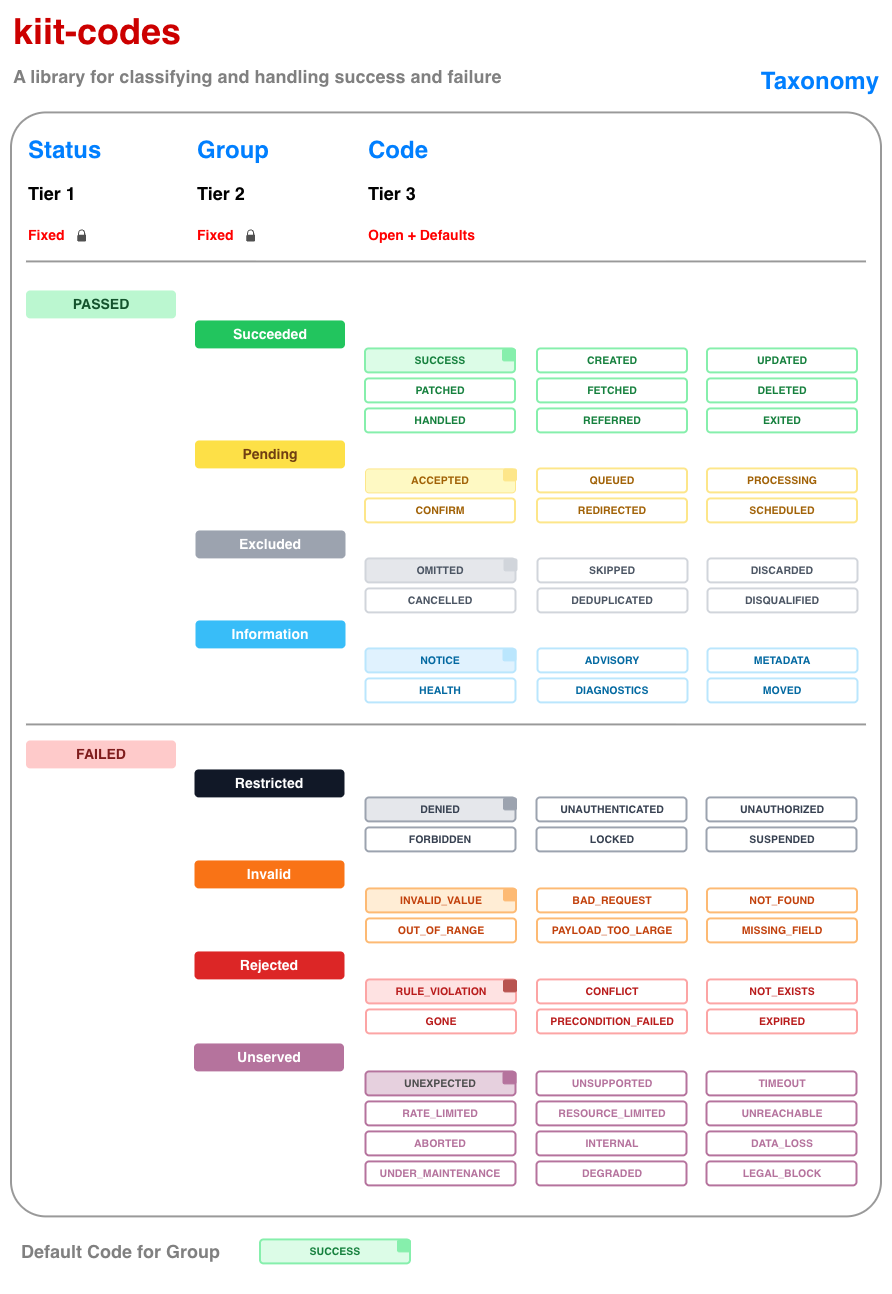
| Tier | Parent | Fixed/Open | Children | Description |
|---|---|---|---|---|
| 1 | Status | Fixed | Passed | |
| Failed | ||||
| 2 | Group | Fixed | Succeeded | The operation completed successfully. |
| Pending | The operation was accepted but has not yet fully resolved. | |||
| Excluded | The item was intentionally excluded from the operation. | |||
| Information | The response provides information; no operation was performed. | |||
| Restricted | The caller is not allowed. | |||
| Invalid | The request itself is wrong. | |||
| Rejected | The caller was allowed, but the business refuses it. | |||
| Unserved | The system can't serve it right now, though nothing was wrong with the request. | |||
| 3 | Code | Open + Defaults | Ships with common built-in codes (e.g. SUCCESS, DENIED); extensible with custom, domain-specific codes within the same group. |
Each group has a default code for when nothing more specific applies. Invalid.DEFAULT is INVALID_VALUE, and isDefault is true for a group's default and for no other code. The full list is in Codes.
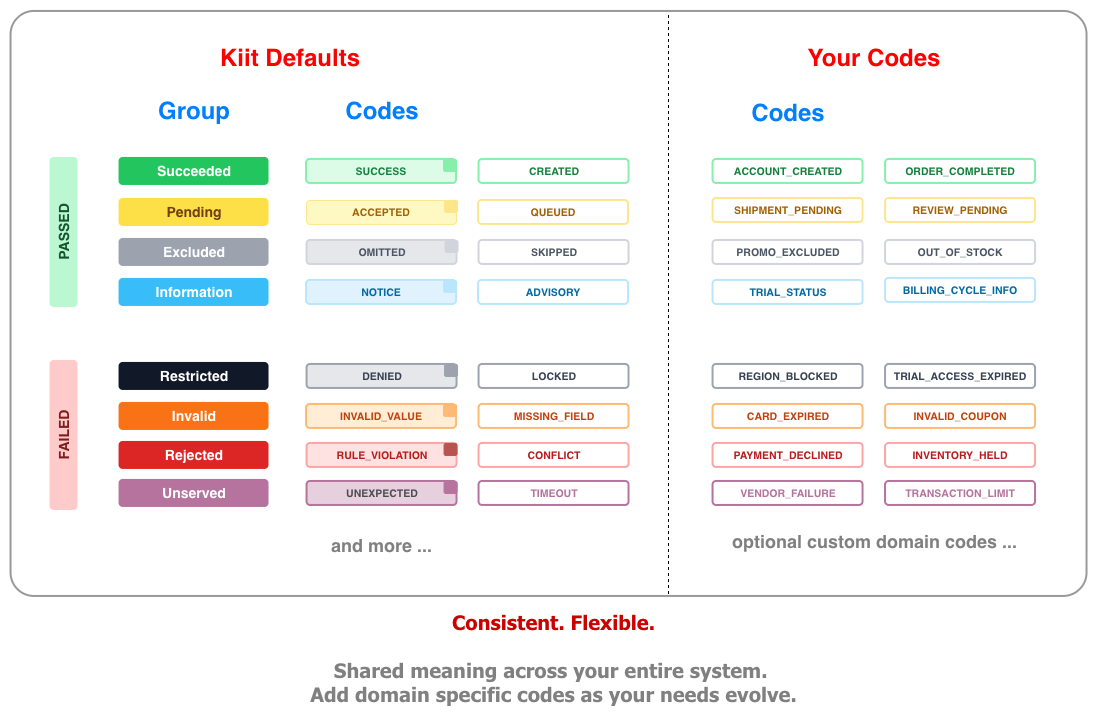
Every Status carries the same six fields, built-in or custom:
| Field | Why it exists |
|---|---|
| success | true for Passed, false for Failed. A quick check that doesn't need the group. |
| group | The kind of outcome (Succeeded, Invalid, ...). Lets generic code handle any Status, including custom ones, without knowing its name. |
| name | A stable, CAPITAL_SNAKE_CASE key that logs, metrics and clients can match on. Never built from runtime data. |
| title | A constant, human-readable title for the code, not a description of one occurrence. It fills title in a Problem and a CodeDetail. Per-occurrence detail lives in an Err. |
| origin | Who owns the code: kiit.dev for built-ins, your domain or a name of your own for custom codes. Keeps custom codes apart from the built-in ones and other teams', and becomes the host of an RFC 9457 type. |
| scope | An optional label inside an origin, such as a department or product area (payments.cards). Empty when unset. Never parsed. |
- Name:
CAPITAL_SNAKE_CASEby convention. Letters, digits,.,-and_, starting with a letter or digit. - Scope: Levels split by
., such aspayments.cards. Same characters as the name, and it may be empty. - Origin: A domain you own or a specific name. Same characters as the name.
kiit.devis reserved for kiit-authored codes. - As written:
codeandtypeuse these values exactly as you write them. Case is not changed. - Checked: Creating a status with any other character, or an empty name or origin, throws.
StatusRules.checktests values without throwing.
- Domain: A domain you own is unique through DNS, so your codes can't collide with anyone else's.
- Plain id: A plain id such as
myapp1can collide with another team's, and kiit-codes can't detect it. Pick a specific name. - Also a host: A domain origin becomes the host of the RFC 9457
type, for examplehttps://samples.kiit.dev/docs/codes/.... A plain id is not a host, so itstypeis the relative/docs/codes/.... Register a base URL to get an absolute one.
Errors
A Status is the kind of outcome. The details of one occurrence travel separately, in three types:
| Type | What it is |
|---|---|
Err | The details of one occurrence: which field, what value, what message. The variants and builders are in Err types. |
Checked | A status and its errors together, so they never disagree: a passing Checked has no errors, a failing one has at least one. collect(...) combines several into one. |
StatusException | For boundaries that only understand exceptions, with one subclass per failed group: RestrictedException, InvalidException, RejectedException and UnservedException. Failed.toException() picks the right one. Each subclass is open, so your own exception can extend one and carry its own data. In TypeScript the classes are StatusError, RestrictedError, InvalidError, RejectedError and UnservedError, and toError(failed) picks the right one. |
- Status: The kind of outcome, constant:
Invalid.INVALID_VALUE. - Err: The details of this occurrence: which field, what value, what message.
- Together:
Checkedcarries both, so a status and its errors travel together.
See Validate and Match and Exceptions.
Responses
How a status becomes a protocol code. For a response body, see RFC 9457.
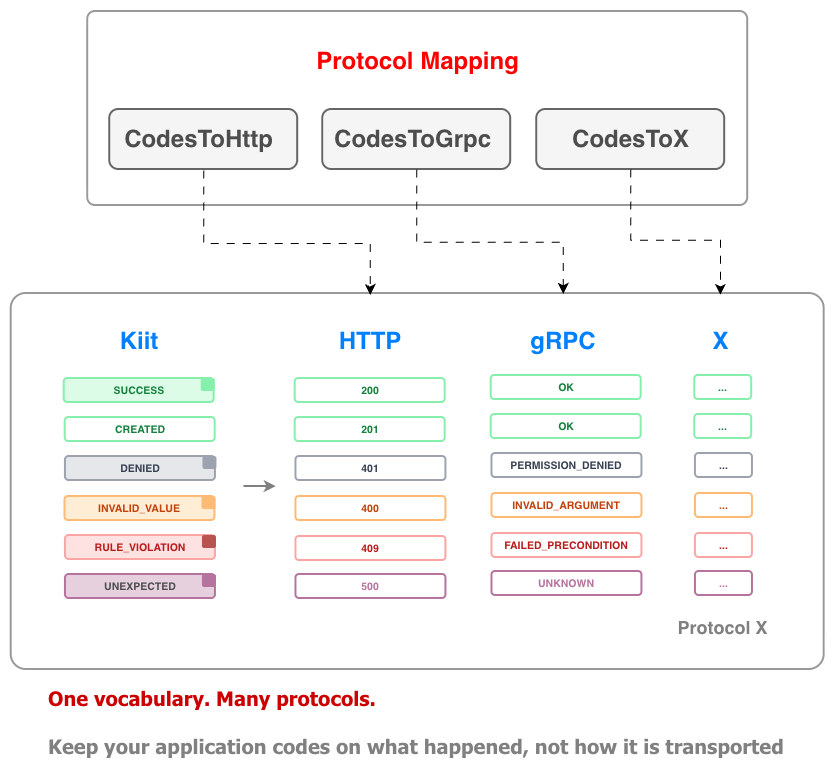
| Type | Purpose |
|---|---|
CodesToHttp | Maps Status to HTTP status codes. |
CodesToGrpc | Maps Status to gRPC status codes. |
CodeLookup | Interface for a mapping to any other protocol. |
CompositeLookup | Combines a base CodeLookup with per-code overrides. |
- No reverse conversion: An HTTP or gRPC code can't give back a
Status, since many share one code. - Carry the status instead: Send the
codeof aCodeDetailorProblem, the exact status.
RFC 9457
RFC 9457 is the IETF standard for error responses from HTTP APIs, and it replaces RFC 7807.
kiit-codes returns it as a Problem, so clients and tools that already understand problem details work with it as they are.
It adds errors and code as extension members. For calls between your own services, where HTTP and a public URL don't apply,
CodeDetail is a lighter, self-contained shape. The same validation failure in both:
{
  "type": "https://www.kiit.dev/docs/kiit-codes?code=Failed:Invalid:INVALID_VALUE#codes",
  "title": "The request had an invalid value.",
  "detail": "Validation failed",
  "code": "kiit.dev:codes:Failed:Invalid:INVALID_VALUE",
  "status": 400,
  "errors": [
    {
      "field": "title",
      "message": "must be 1-100 characters"
    },
    {
      "field": "listId",
      "message": "unknown list"
    }
  ]
}
{
  "code": "kiit.dev:codes:Failed:Invalid:INVALID_VALUE",
  "title": "The request had an invalid value.",
  "detail": "Validation failed",
  "success": false,
  "errors": [
    {
      "field": "title",
      "message": "must be 1-100 characters"
    },
    {
      "field": "listId",
      "message": "unknown list"
    }
  ]
}
They use the same field names:
| Field | Problem | CodeDetail |
|---|---|---|
type | the problem's identity and its docs URL | none |
code | the exact status, an extension member | the exact status |
title | the fixed text of the status | the fixed text of the status |
detail | this occurrence | this occurrence |
instance | this occurrence | this occurrence |
errors | every error, an extension member | every error |
status | the HTTP status, always set | the HTTP status, optional |
success | none | true or false |
- type: Only
Problemhas it. RFC 9457 makes it the problem's identifier and docs link. - status: Optional on
CodeDetail, since an HTTP status only makes sense over HTTP. - success: Only on
CodeDetail, so a reader sees pass or fail without parsingcode.
code is the origin, the scope and then the status code, so one field says which status it is. Built-in statuses use the scope codes.
type names the same status as a URL, and the two differ:
Problem.type | code | |
|---|---|---|
| Identity | yes, RFC 9457's primary identifier | yes, exact |
| Docs | yes, when it resolves | no |
| Self-contained | no, needs a host or a base | yes |
| Case | as written | as written |
Every error goes into errors. Each entry has only a field and a message. The cause and the value that failed validation are left out
on purpose, since echoing them back is a disclosure risk.
- Problem: An HTTP API that other parties call.
- CodeDetail: Calls between your own services, and jobs.
- Neither: When the status alone is enough.
- Passed statuses: RFC 9457 describes problems, so use a
ProblemforFailedand aCodeDetailforPassed.
Security
Every status carries an origin, a scope and a name, and all three end up in what a client sees. Treat them as public, like a route in your API. RFC 9457 asks that the information in a problem type is carefully vetted, and that the details of a generated problem are scrutinized. See section 5 of the RFC for more.
{
  "type": "https://stripe.com/docs/codes/payments/cards/Failed/Rejected/DUPLICATE_CHARGE",
  "code": "stripe.com:payments.cards:Failed:Rejected:DUPLICATE_CHARGE"
}
| Value | Fine to show | Avoid |
|---|---|---|
| origin | stripe.com | billing-internal.corp.example.com, an internal host |
| scope | payments.cards | payments.fraud-review, an internal step |
| name | DUPLICATE_CHARGE | BETA_WALLET_LIMIT, a feature that has not launched |
kiit-codes doesn't inspect these values. The baseUrls of ProblemConverter, or a type builder, change type, but code always carries the origin and
the scope. See Response: Keep internals out. detail, instance and errors describe one occurrence,
so keep stack traces and internal identifiers out of them.
Guide
Recipes for common tasks, grouped like the topics in Explanation.
| # | Recipe | Use it to |
|---|---|---|
| 1 | Status: Built-ins | Use a standard outcome, or a group's default |
| 2 | Status: Custom code | Name an outcome that is specific to your domain |
| 3 | Status: Pattern matching | Turn a status into a response or a decision |
| 4 | Error Handling: Collect errors | Report all the problems at once |
| 5 | Error Handling: Error details | Say which field failed and why |
| 6 | Error Handling: Exceptions | Cross a boundary that only understands exceptions, or add your own data to one |
| 7 | Error Handling: Result | Pair a value with a status, with kiit-result |
| 8 | Response: JSON | Send an error body to a client |
| 9 | Response: Type URL | Know which type a status produces |
| 10 | Response: Custom type URL | Change the suffix, the base, or the whole URL |
| 11 | Response: Keep internals out | Keep an internal host or scope out of a response |
| 12 | Response: HTTP and gRPC | Pick the response code at the edge of your service |
| 13 | Response: Custom protocol | Give a custom code its own value, such as 402 |
Status: Built-ins
Use a built-in code for a standard outcome. When you only know the kind of outcome and not the exact code, use the group's default. Statuses are values, so a test can compare them directly with assertEquals(Rejected.CONFLICT, tasks.create("groceries")).
- Kotlin
- Java
- TypeScript
- Swift
// A specific built-in code
val created = Succeeded.CREATED
// The group's default, when you only know the kind of outcome
val failed = Invalid.DEFAULT
// INVALID_VALUE
println(failed.name)
// true
println(failed.isDefault)
// false
println(Invalid.BAD_REQUEST.isDefault)
// A specific built-in code
Status created = Passed.Succeeded.CREATED;
// The group's default, when you only know the kind of outcome
Failed.Invalid failed = Failed.Invalid.DEFAULT;
// INVALID_VALUE
System.out.println(failed.getName());
// true
System.out.println(failed.isDefault());
// false
System.out.println(Failed.Invalid.BAD_REQUEST.isDefault());
// A specific built-in code
const created = Succeeded.CREATED;
// The group's default, when you only know the kind of outcome
const failed = Invalid.DEFAULT;
// INVALID_VALUE
console.log(failed.name);
// true
console.log(isDefault(failed));
// false
console.log(isDefault(Invalid.BAD_REQUEST));
// A specific built-in code
let created = Passed.Succeeded.companion.CREATED
// The group's default, when you only know the kind of outcome
let failed = Failed.Invalid.companion.DEFAULT
// INVALID_VALUE
print(failed.name)
// true
print(failed.isDefault)
// false
print(Failed.Invalid.companion.BAD_REQUEST.isDefault)
Status: Custom code
Use it when a built-in code is too generic for your domain, such as a payment that was declined. A custom code stays in one of the eight groups, so generic handling still works on it. Pick an origin you own, such as a domain.
- Kotlin
- Java
- TypeScript
- Swift
val PAYMENT_DECLINED =
    Rejected(
        name = "PAYMENT_DECLINED",
        title = "Payment declined",
        origin = "payments.example.com",
        scope = "payments.cards",
    )

// A bad origin, scope or name throws when the status is created. For values from config, check them first
// null, the values are valid
println(StatusRules.check(origin = "payments.example.com", scope = "payments.cards", name = "PAYMENT_DECLINED"))
// origin "host:8080" is invalid: allowed characters are a-z, A-Z, 0-9, '.', '-', '_'
println(StatusRules.check(origin = "host:8080", scope = "", name = "PAYMENT_DECLINED"))
Failed.Rejected PAYMENT_DECLINED =
        new Failed.Rejected("PAYMENT_DECLINED", "Payment declined", "payments.example.com", "payments.cards");

// A bad origin, scope or name throws when the status is created. For values from config, check them first
// null, the values are valid
System.out.println(StatusRules.check("payments.example.com", "payments.cards", "PAYMENT_DECLINED"));
// origin "host:8080" is invalid: allowed characters are a-z, A-Z, 0-9, '.', '-', '_'
System.out.println(StatusRules.check("host:8080", "", "PAYMENT_DECLINED"));
const PAYMENT_DECLINED = Rejected("PAYMENT_DECLINED", "Payment declined", "payments.example.com", "payments.cards");

// A bad origin, scope or name throws when the status is created. For values from config, check them first
// null, the values are valid
console.log(StatusRules.check("payments.example.com", "payments.cards", "PAYMENT_DECLINED"));
// origin "host:8080" is invalid: allowed characters are a-z, A-Z, 0-9, '.', '-', '_'
console.log(StatusRules.check("host:8080", "", "PAYMENT_DECLINED"));
let PAYMENT_DECLINED = try Failed.Rejected(
    name: "PAYMENT_DECLINED",
    title: "Payment declined",
    origin: "payments.example.com",
    scope: "payments.cards"
)

// A bad origin, scope or name throws when the status is created. For values from config, check them first
// nil, the values are valid
print(StatusRules.shared.check(origin: "payments.example.com", scope: "payments.cards", name: "PAYMENT_DECLINED") ?? "nil")
// origin "host:8080" is invalid: allowed characters are a-z, A-Z, 0-9, '.', '-', '_'
print(StatusRules.shared.check(origin: "host:8080", scope: "", name: "PAYMENT_DECLINED") ?? "nil")
Status: Pattern matching
Use it to turn a status into a response, a log level or a retry decision. Match a code first, then a group, then the broad branches, because the first branch that fits wins and a broader branch above a specific one means the specific one never runs.
- Kotlin
- Java
- TypeScript
- Swift
// 1. Passed or Failed
fun binary(status: Status): String =
    when (status) {
        is Passed -> "ok: ${status.name}"
        is Failed -> "failed: ${status.name}"
    }

// 2. Passed or Failed, each by its four groups. The compiler flags a missing group.
fun nested(status: Status): String =
    when (status) {
        is Passed ->
            when (status) {
                is Succeeded -> "done"
                is Pending -> "in progress"
                is Excluded -> "skipped"
                is Information -> "for your information"
            }
        is Failed ->
            when (status) {
                is Restricted -> "not allowed"
                is Invalid -> "fix the input"
                is Rejected -> "refused by a rule"
                is Unserved -> "try again later"
            }
    }

// 3. Specific to broad: a code, then a group, then Failed or Passed
fun hybrid(status: Status): String =
    when (status) {
        Rejected.CONFLICT -> "already exists"
        is Invalid -> "fix the input"
        is Failed -> "failed: ${status.name}"
        is Passed -> "ok: ${status.name}"
    }

// failed: INVALID_VALUE
println(binary(Invalid.INVALID_VALUE))
// in progress
println(nested(Pending.QUEUED))
// already exists
println(hybrid(Rejected.CONFLICT))
// 1. Passed or Failed
Function<Status, String> binary = status -> switch (status) {
    case Passed passed -> "ok: " + passed.getName();
    case Failed failed -> "failed: " + failed.getName();
};

// 2. Passed or Failed, each by its four groups. The compiler flags a missing group.
Function<Status, String> nested = status -> switch (status) {
    case Passed.Succeeded s -> "done";
    case Passed.Pending p -> "in progress";
    case Passed.Excluded e -> "skipped";
    case Passed.Information i -> "for your information";
    case Failed.Restricted r -> "not allowed";
    case Failed.Invalid i -> "fix the input";
    case Failed.Rejected r -> "refused by a rule";
    case Failed.Unserved u -> "try again later";
};

// 3. Specific to broad: a code, then a group, then Failed or Passed
Function<Status, String> hybrid = status -> switch (status) {
    case Failed.Rejected r when r.getName().equals("CONFLICT") -> "already exists";
    case Failed.Invalid i -> "fix the input";
    case Failed failed -> "failed: " + failed.getName();
    case Passed passed -> "ok: " + passed.getName();
};

// failed: INVALID_VALUE
System.out.println(binary.apply(Failed.Invalid.INVALID_VALUE));
// in progress
System.out.println(nested.apply(Passed.Pending.QUEUED));
// already exists
System.out.println(hybrid.apply(Failed.Rejected.CONFLICT));
// 1. Passed or Failed
function binary(status: Status): string {
  if (status.success) {
    return `ok: ${status.name}`;
  }
  return `failed: ${status.name}`;
}

// 2. Each of the eight groups. The compiler flags a missing group.
function nested(status: Status): string {
  switch (status.group) {
    case Groups.SUCCEEDED:
      return "done";
    case Groups.PENDING:
      return "in progress";
    case Groups.EXCLUDED:
      return "skipped";
    case Groups.INFORMATION:
      return "for your information";
    case Groups.RESTRICTED:
      return "not allowed";
    case Groups.INVALID:
      return "fix the input";
    case Groups.REJECTED:
      return "refused by a rule";
    case Groups.UNSERVED:
      return "try again later";
    default:
      return assertNever(status);
  }
}

// 3. Specific to broad: a code, then a group, then Failed or Passed
function hybrid(status: Status): string {
  if (status.group === Groups.REJECTED && status.name === "CONFLICT") {
    return "already exists";
  }
  if (status.group === Groups.INVALID) {
    return "fix the input";
  }
  if (!status.success) {
    return `failed: ${status.name}`;
  }
  return `ok: ${status.name}`;
}

// failed: INVALID_VALUE
console.log(binary(Invalid.INVALID_VALUE));
// in progress
console.log(nested(Pending.QUEUED));
// already exists
console.log(hybrid(Rejected.CONFLICT));
// 1. Passed or Failed
func binary(_ status: Status) -> String {
    switch onEnum(of: status) {
    case .passed(let passed): return "ok: \(passed.name)"
    case .failed(let failed): return "failed: \(failed.name)"
    }
}

// 2. Passed or Failed, each by its four groups. Two switches, one per sealed type, both exhaustive.
func nested(_ status: Status) -> String {
    switch onEnum(of: status) {
    case .passed(let passed):
        switch onEnum(of: passed) {
        case .succeeded: return "done"
        case .pending: return "in progress"
        case .excluded: return "skipped"
        case .information: return "for your information"
        }
    case .failed(let failed):
        switch onEnum(of: failed) {
        case .restricted: return "not allowed"
        case .invalid: return "fix the input"
        case .rejected: return "refused by a rule"
        case .unserved: return "try again later"
        }
    }
}

// 3. Specific to broad: a code, then a group, then Failed or Passed
func hybrid(_ status: Status) -> String {
    if let rejected = status as? Failed.Rejected, rejected.name == "CONFLICT" {
        return "already exists"
    }
    if status is Failed.Invalid {
        return "fix the input"
    }
    if !status.success {
        return "failed: \(status.name)"
    }
    return "ok: \(status.name)"
}

// failed: INVALID_VALUE
print(binary(Failed.Invalid.companion.INVALID_VALUE))
// in progress
print(nested(Passed.Pending.companion.QUEUED))
// already exists
print(hybrid(Failed.Rejected.companion.CONFLICT))
Error Handling: Collect errors
Use it for a form or a request with several fields, so the caller sees every problem in one response and not one at a time.
- Kotlin
- Java
- TypeScript
- Swift
fun validateTitle(title: String): Checked =
    if (title.isNotBlank()) {
        Checked.success()
    } else {
        Checked.failure(Invalid.INVALID_VALUE, listOf(Err.on("title", title, "must not be blank")))
    }

fun validateListId(listId: String): Checked =
    if (listId in setOf("personal", "team")) {
        Checked.success()
    } else {
        Checked.failure(Invalid.NOT_FOUND, listOf(Err.on("listId", listId, "unknown list")))
    }

val checked =
    collect(
        validateTitle(""),
        validateListId("unknown-list"),
    )
// valid = false, errors = 2
println("valid = ${checked.isValid}, errors = ${checked.errors.size}")
Function<String, Checked> validateTitle = title -> {
    if (!title.isBlank()) {
        return Checked.success();
    }
    return Checked.failure(Failed.Invalid.INVALID_VALUE, List.of(Err.on("title", title, "must not be blank")));
};

Function<String, Checked> validateListId = listId -> {
    if (List.of("personal", "team").contains(listId)) {
        return Checked.success();
    }
    return Checked.failure(Failed.Invalid.NOT_FOUND, List.of(Err.on("listId", listId, "unknown list")));
};

Checked checked = Checks.collect(validateTitle.apply(""), validateListId.apply("unknown-list"));
// valid = false, errors = 2
System.out.println("valid = " + checked.isValid() + ", errors = " + checked.getErrors().size());
function validateTitle(title: string): Checked {
  if (title.trim() !== "") {
    return Checked.success();
  }
  return Checked.failure(Invalid.INVALID_VALUE, [Err.on("title", title, "must not be blank")]);
}

function validateListId(listId: string): Checked {
  if (["personal", "team"].includes(listId)) {
    return Checked.success();
  }
  return Checked.failure(Invalid.NOT_FOUND, [Err.on("listId", listId, "unknown list")]);
}

const checked = collect(validateTitle(""), validateListId("unknown-list"));
// valid = false, errors = 2
console.log(`valid = ${checked.isValid}, errors = ${checked.errors.length}`);
func validateTitle(_ title: String) -> Checked {
    if !title.trimmingCharacters(in: .whitespaces).isEmpty {
        return Checked.companion.success(status: Passed.Succeeded.companion.SUCCESS)
    }
    return Checked.companion.failure(
        status: Failed.Invalid.companion.INVALID_VALUE,
        errors: [Err.companion.on(field: "title", value: title, message: "must not be blank", ex: nil)]
    )
}

func validateListId(_ listId: String) -> Checked {
    if ["personal", "team"].contains(listId) {
        return Checked.companion.success(status: Passed.Succeeded.companion.SUCCESS)
    }
    return Checked.companion.failure(
        status: Failed.Invalid.companion.NOT_FOUND,
        errors: [Err.companion.on(field: "listId", value: listId, message: "unknown list", ex: nil)]
    )
}

let checked = collect(checks: [validateTitle(""), validateListId("unknown-list")])
// valid = false, errors = 2
print("valid = \(checked.isValid), errors = \(checked.errors.count)")
Error Handling: Error details
Use it to say which field failed and why. Leave the value out for a sensitive field, so it is never echoed back.
- Kotlin
- Java
- TypeScript
- Swift
// A plain message
val plain = Err.of("title is required")
// An error on one field, with its value
val title = Err.on("title", "", "must be 1-100 characters")
// The same, without the value
val password = Err.on("password", "must be at least 12 characters")
// Several plain messages under one message
val many = Err.list(listOf("title is required", "list is unknown"), "Validation failed")
// A plain message
Err plain = Err.of("title is required");
// An error on one field, with its value
Err title = Err.on("title", "", "must be 1-100 characters");
// The same, without the value
Err password = Err.on("password", "must be at least 12 characters");
// Several plain messages under one message
Err.ErrorList many = Err.list(List.of("title is required", "list is unknown"), "Validation failed");
// A plain message
const plain = Err.of("title is required");
// An error on one field, with its value
const title = Err.on("title", "", "must be 1-100 characters");
// The same, without the value
const password = Err.onField("password", "must be at least 12 characters");
// Several plain messages under one message
const many = Err.list(["title is required", "list is unknown"], "Validation failed");
// A plain message
let plain = Err.companion.of(message: "title is required", ex: nil)
// An error on one field, with its value
let title = Err.companion.on(field: "title", value: "", message: "must be 1-100 characters", ex: nil)
// The same, without the value
let password = Err.companion.on(field: "password", message: "must be at least 12 characters", ex: nil)
// Several plain messages under one message
let many = Err.companion.list(errors: ["title is required", "list is unknown"], message: "Validation failed")
Error Handling: Exceptions
Use it when a framework or a callback only understands exceptions. toException() picks the subclass for the status group, so
the caller can catch the kind of failure it cares about. In Java it is a checked exception. In TypeScript the base class is StatusError, there is one *Error class per group such as RejectedError, and the function is toError(). Kotlin exceptions do not bridge to Swift's Error, so there is no Swift tab.
- Kotlin
- Java
- TypeScript
fun create(title: String): Status =
    if (title == "groceries") Rejected.CONFLICT else Succeeded.CREATED

fun createOrThrow(title: String) {
    val status = create(title)
    if (status is Failed) throw status.toException()
}

try {
    createOrThrow("groceries")
} catch (e: StatusException.RejectedException) {
    // CONFLICT
    println(e.status.name)
}
Function<String, Status> create = title ->
        title.equals("groceries") ? Failed.Rejected.CONFLICT : Passed.Succeeded.CREATED;

// StatusException is a checked exception in Java
try {
    Status status = create.apply("groceries");
    if (status instanceof Failed failed) {
        throw StatusExceptions.toException(failed);
    }
} catch (StatusException e) {
    // CONFLICT
    System.out.println(e.getStatus().getName());
}
function create(title: string): Status {
  return title === "groceries" ? Rejected.CONFLICT : Succeeded.CREATED;
}

function createOrThrow(title: string): void {
  const status = create(title);
  if (!status.success) {
    throw toError(status);
  }
}

try {
  createOrThrow("groceries");
} catch (e) {
  if (e instanceof RejectedError) {
    // CONFLICT
    console.log(e.status.name);
  }
}
To carry data of your own, extend the subclass for the group. The status is fixed by the group you extend, and status has that narrow type, so a RestrictedException gives you a Failed.Restricted with no cast. message is the one line summary and defaults to the status title. errors is the full list and is separate from message, so setting one does not change the other.
Match the narrow type before its group. The first match wins, so a when or a catch that lists the group first never reaches your subclass. Kotlin does not warn about that order, and Java rejects it at compile time. The iOS *Error classes are final, so they cannot be extended from Swift.
- Kotlin
- Java
- TypeScript
// A domain exception: the status is fixed, the data and the message are yours
class OrderShippedException(val orderId: String) :
    StatusException.RejectedException(Rejected.CONFLICT, message = "Order $orderId already shipped")

fun describe(e: StatusException): String =
    when (e) {
        // The narrow type goes first, the first match wins
        is OrderShippedException -> "order ${e.orderId} shipped"
        is StatusException.RejectedException -> "rejected"
        is StatusException.RestrictedException -> "restricted"
        is StatusException.InvalidException -> "invalid"
        is StatusException.UnservedException -> "unserved"
    }

// order A-1 shipped
println(describe(OrderShippedException("A-1")))
// rejected
println(describe(Rejected.CONFLICT.toException()))

try {
    throw OrderShippedException("A-1")
} catch (e: OrderShippedException) {
    // Order A-1 already shipped
    println(e.message)
} catch (e: StatusException.RejectedException) {
    println(e.status.name)
}
// A domain exception: the status is fixed, the data and the message are yours
class OrderShippedException extends StatusException.RejectedException {
    private final String orderId;

    OrderShippedException(String orderId) {
        super(Failed.Rejected.CONFLICT, "Order " + orderId + " already shipped");
        this.orderId = orderId;
    }

    String getOrderId() {
        return orderId;
    }
}

Function<StatusException, String> describe = e -> switch (e) {
    // The narrow type goes first, Java rejects a broader case before it
    case OrderShippedException o -> "order " + o.getOrderId() + " shipped";
    case StatusException.RejectedException r -> "rejected";
    case StatusException.RestrictedException r -> "restricted";
    case StatusException.InvalidException i -> "invalid";
    case StatusException.UnservedException u -> "unserved";
};

// order A-1 shipped
System.out.println(describe.apply(new OrderShippedException("A-1")));
// rejected
System.out.println(describe.apply(StatusExceptions.toException(Failed.Rejected.CONFLICT)));

StatusException thrown = new OrderShippedException("A-1");
try {
    throw thrown;
} catch (OrderShippedException e) {
    // Order A-1 already shipped
    System.out.println(e.getMessage());
} catch (StatusException.RejectedException e) {
    System.out.println(e.getStatus().getName());
} catch (StatusException e) {
    // Checked in Java, so the base type is caught last
    System.out.println(e.getStatus().getName());
}
// A domain error: the status is fixed, the data and the message are yours
class OrderShippedError extends RejectedError {
  readonly orderId: string;

  constructor(orderId: string) {
    super(Rejected.CONFLICT, `Order ${orderId} already shipped`);
    this.orderId = orderId;
  }
}

function describe(e: StatusError): string {
  // The narrow class goes first, the first match wins
  if (e instanceof OrderShippedError) return `order ${e.orderId} shipped`;
  if (e instanceof RejectedError) return "rejected";
  if (e instanceof InvalidError) return "invalid";
  if (e instanceof UnservedError) return "unserved";
  return "restricted";
}

// order A-1 shipped
console.log(describe(new OrderShippedError("A-1")));
// rejected
console.log(describe(toError(Rejected.CONFLICT)));

try {
  throw new OrderShippedError("A-1");
} catch (e) {
  if (e instanceof OrderShippedError) {
    // Order A-1 already shipped
    console.log(e.message);
  } else if (e instanceof RejectedError) {
    console.log(e.status.name);
  }
}
Error Handling: Result
Use kiit-result when a function should return a value on success and a failure otherwise. It builds a Result<T, E> on
this same taxonomy.
Response: JSON
Use a Problem for an HTTP API that other parties call, and a CodeDetail between your own services. kiit-codes has no JSON dependency.
In Kotlin its classes are not @Serializable, so map each one to a small class of your own, and the order you declare the fields is the order in the JSON.
In TypeScript they are plain objects, so JSON.stringify works on them and listing the fields sets the order.
Java and Swift have no example here, so use the JSON library you already have.
- Kotlin
- TypeScript
@Serializable
data class ErrorJson(val field: String? = null, val message: String)

@Serializable
data class ProblemJson(
    val type: String,
    val title: String,
    val detail: String? = null,
    val code: String? = null,
    val status: Int? = null,
    val errors: List<ErrorJson>? = null,
)

@Serializable
data class CodeDetailJson(
    val code: String,
    val title: String,
    val detail: String? = null,
    val success: Boolean,
    val errors: List<ErrorJson>? = null,
)

fun Problem<ErrorDetail>.toJson() =
    ProblemJson(type, title, detail, code, status, errors?.map { ErrorJson(it.field, it.message) })

fun CodeDetail<ErrorDetail>.toJson() =
    CodeDetailJson(code, title, detail, success, errors?.map { ErrorJson(it.field, it.message) })

val json = Json { prettyPrint = true }
val errors = Err.ErrorList(listOf(Err.on("title", "", "must be 1-100 characters")), "Validation failed")

// An RFC 9457 problem, for an HTTP API
println(json.encodeToString(ProblemConverter().convert(Invalid.INVALID_VALUE, errors).toJson()))
// A CodeDetail, for your own services
println(json.encodeToString(toCodeDetail(Invalid.INVALID_VALUE, errors).toJson()))
// A Problem and a CodeDetail are plain objects, so JSON.stringify works on them directly.
// Listing the fields sets their order in the JSON.
const errors = ErrorList([Err.on("title", "", "must be 1-100 characters")], "Validation failed");
const problem = ProblemConverter().convert(Invalid.INVALID_VALUE, errors);
const detail = toCodeDetail(Invalid.INVALID_VALUE, errors);

// An RFC 9457 problem, for an HTTP API
console.log(
  JSON.stringify(
    {
      type: problem.type,
      title: problem.title,
      detail: problem.detail,
      code: problem.code,
      status: problem.status,
      errors: problem.errors,
    },
    null,
    2,
  ),
);
// A CodeDetail, for your own services
console.log(
  JSON.stringify(
    {
      code: detail.code,
      title: detail.title,
      detail: detail.detail,
      success: detail.success,
      errors: detail.errors,
    },
    null,
    2,
  ),
);
Response: Type URL
Use it to know which type your statuses produce, and to make it point at your own docs. A custom code with the origin stripe.com gives a type like this:
https://stripe.com/docs/codes/payments/cards/Failed/Rejected/DUPLICATE_CHARGE
^^^^^^^^^^^^^^^^^^^^^^^^^^^^^ ^^^^^^^^^^^^^^ ^^^^^^ ^^^^^^^^ ^^^^^^^^^^^^^^^^
base                          scope          status group    name
type is the base URL plus a suffix. The suffix is the scope, then the status, group and name. The base is chosen like this:
| You provide | Origin | Base URL |
|---|---|---|
| Nothing | kiit.dev, a built-in | https://www.kiit.dev/docs/kiit-codes, fixed |
| Nothing | A domain, such as stripe.com | https://stripe.com/docs/codes |
| Nothing | A plain id, such as myapp1 | /docs/codes, relative |
A baseUrls entry for the origin | Any except kiit.dev | Your URL, always absolute |
convertWithUrl(baseUrl = …) | Any | The URL you pass for that call |
- Tail:
{scope}/{status}/{group}/{name}. The last three are the values ofStatus.code(statusCode(status)in TypeScript) with/in place of:.- Status:
PassedorFailed. - Group: the group of the code, such as
Rejected. - Name: the name of the code, such as
DUPLICATE_CHARGE.
- Status:
- Scope: Each
.becomes/, sopayments.cardsispayments/cards. An empty scope is skipped. - Origin: It picks the base URL and is not in the tail. A domain is recognized by its form alone, with no DNS lookup.
- Names: A name and a scope follow the field rules.
- Stable:
typeis the problem's identity, so pick the base once and keep it. - Built-ins: A built-in links to the Codes section of this page, as
?code=Failed:Invalid:INVALID_VALUE#codes, and abaseUrlsentry forkiit.devis ignored. The origin is reserved for kiit-authored codes, so a custom status must not use it. - Read code: The tail is a readable form of the same values as
code. Readcodefor the origin, the scope and the status.
- Kotlin
- Java
- TypeScript
- Swift
val stripe = Rejected("DUPLICATE_CHARGE", "Duplicate charge", origin = "stripe.com", scope = "payments.cards")
val plain = Rejected("OUT_OF_STOCK", "Out of stock", origin = "myapp1")

// 1. A domain origin and nothing registered
// https://stripe.com/docs/codes/payments/cards/Failed/Rejected/DUPLICATE_CHARGE
println(ProblemConverter().convert(stripe).type)

// 2. A plain id is not a domain, so the type is relative
// /docs/codes/Failed/Rejected/OUT_OF_STOCK
println(ProblemConverter().convert(plain).type)

// 3. A base URL registered for the origin
// https://stripe.com/errors/payments/cards/Failed/Rejected/DUPLICATE_CHARGE
val registered = ProblemConverter(baseUrls = mapOf("stripe.com" to "https://stripe.com/errors"))
println(registered.convert(stripe).type)
Failed.Rejected stripe = new Failed.Rejected("DUPLICATE_CHARGE", "Duplicate charge", "stripe.com", "payments.cards");
Failed.Rejected plain = new Failed.Rejected("OUT_OF_STOCK", "Out of stock", "myapp1", "");

// 1. A domain origin and nothing registered
// https://stripe.com/docs/codes/payments/cards/Failed/Rejected/DUPLICATE_CHARGE
System.out.println(new ProblemConverter().convert(stripe).getType());

// 2. A plain id is not a domain, so the type is relative
// /docs/codes/Failed/Rejected/OUT_OF_STOCK
System.out.println(new ProblemConverter().convert(plain).getType());

// 3. A base URL registered for the origin
// https://stripe.com/errors/payments/cards/Failed/Rejected/DUPLICATE_CHARGE
ProblemConverter registered = new ProblemConverter(Map.of("stripe.com", "https://stripe.com/errors"));
System.out.println(registered.convert(stripe).getType());
const stripe = Rejected("DUPLICATE_CHARGE", "Duplicate charge", "stripe.com", "payments.cards");
const plain = Rejected("OUT_OF_STOCK", "Out of stock", "myapp1");

// 1. A domain origin and nothing registered
// https://stripe.com/docs/codes/payments/cards/Failed/Rejected/DUPLICATE_CHARGE
console.log(ProblemConverter().convert(stripe).type);

// 2. A plain id is not a domain, so the type is relative
// /docs/codes/Failed/Rejected/OUT_OF_STOCK
console.log(ProblemConverter().convert(plain).type);

// 3. A base URL registered for the origin
// https://stripe.com/errors/payments/cards/Failed/Rejected/DUPLICATE_CHARGE
const registered = ProblemConverter({ "stripe.com": "https://stripe.com/errors" });
console.log(registered.convert(stripe).type);
let stripe = try Failed.Rejected(name: "DUPLICATE_CHARGE", title: "Duplicate charge", origin: "stripe.com", scope: "payments.cards")
let plain = try Failed.Rejected(name: "OUT_OF_STOCK", title: "Out of stock", origin: "myapp1", scope: "")
let http = CodesToHttp(overrides: [:])
let builder = ProblemConverterKt.defaultTypeBuilder

// 1. A domain origin and nothing registered
// https://stripe.com/docs/codes/payments/cards/Failed/Rejected/DUPLICATE_CHARGE
let problems = ProblemConverter(baseUrls: [:], mapping: http)
print(problems.convert(status: stripe, err: nil, typeBuilder: builder).type)

// 2. A plain id is not a domain, so the type is relative
// /docs/codes/Failed/Rejected/OUT_OF_STOCK
print(problems.convert(status: plain, err: nil, typeBuilder: builder).type)

// 3. A base URL registered for the origin
// https://stripe.com/errors/payments/cards/Failed/Rejected/DUPLICATE_CHARGE
let registered = ProblemConverter(baseUrls: ["stripe.com": "https://stripe.com/errors"], mapping: http)
print(registered.convert(status: stripe, err: nil, typeBuilder: builder).type)
Response: Custom type URL
Use it when the default suffix or base does not fit, such as docs that live under your own path. There is no new API, so pick the way that fits how much of the URL you control. Kotlin and TypeScript can also copy the Problem with any type, the Java and Swift examples leave that out.
- Kotlin
- Java
- TypeScript
- Swift
val stripe = Rejected("DUPLICATE_CHARGE", "Duplicate charge", origin = "stripe.com", scope = "payments.cards")
val problems = ProblemConverter()

// 1. Your own suffix, with a type builder
// https://stripe.com/docs/codes/charges/duplicate
println(problems.convert(stripe, typeBuilder = { "charges/duplicate" }).type)

// 2. Exactly one URL, a base with an empty suffix
// https://example.com/probs/duplicate-charge
println(
    problems.convertWithUrl(
        stripe,
        baseUrl = "https://example.com/probs/duplicate-charge",
        typeBuilder = { "" },
    ).type,
)

// 3. Any URL at all, by copying the Problem
// https://other.example.org/probs/duplicate
println(problems.convert(stripe).copy(type = "https://other.example.org/probs/duplicate").type)
Failed.Rejected stripe = new Failed.Rejected("DUPLICATE_CHARGE", "Duplicate charge", "stripe.com", "payments.cards");
ProblemConverter problems = new ProblemConverter();

// 1. Your own suffix, with a type builder
// https://stripe.com/docs/codes/charges/duplicate
System.out.println(problems.convert(stripe, null, status -> "charges/duplicate").getType());

// 2. Exactly one URL, a base with an empty suffix
// https://example.com/probs/duplicate-charge
System.out.println(problems.convertWithUrl(stripe, null, "https://example.com/probs/duplicate-charge", status -> "").getType());
const stripe = Rejected("DUPLICATE_CHARGE", "Duplicate charge", "stripe.com", "payments.cards");
const problems = ProblemConverter();

// 1. Your own suffix, with a type builder
// https://stripe.com/docs/codes/charges/duplicate
console.log(problems.convert(stripe, undefined, () => "charges/duplicate").type);

// 2. Exactly one URL, a base with an empty suffix
// https://example.com/probs/duplicate-charge
console.log(problems.convertWithUrl(stripe, undefined, "https://example.com/probs/duplicate-charge", () => "").type);

// 3. Any URL at all, by copying the Problem
// https://other.example.org/probs/duplicate
console.log({ ...problems.convert(stripe), type: "https://other.example.org/probs/duplicate" }.type);
let stripe = try Failed.Rejected(name: "DUPLICATE_CHARGE", title: "Duplicate charge", origin: "stripe.com", scope: "payments.cards")
let problems = ProblemConverter(baseUrls: [:], mapping: CodesToHttp(overrides: [:]))

// 1. Your own suffix, with a type builder
// https://stripe.com/docs/codes/charges/duplicate
print(problems.convert(status: stripe, err: nil, typeBuilder: { _ in "charges/duplicate" }).type)

// 2. Exactly one URL, a base with an empty suffix
// https://example.com/probs/duplicate-charge
print(problems.convertWithUrl(status: stripe, err: nil, baseUrl: "https://example.com/probs/duplicate-charge", typeBuilder: { _ in "" }).type)
code is built from the status, not from type, so it is the same however type was built. A client that reads code is not affected.
Response: Keep internals out
Use it when an origin or a scope names something clients shouldn't see, such as an internal host or a team. ProblemConverter builds type, and it takes a baseUrls map of origin to base URL.
There is no new API. Pick the option by what you want to hide:
| Hide | How |
|---|---|
The host in type | Pass baseUrls to ProblemConverter, with the origin mapped to a public URL. |
The scope in type | Pass a type builder to ProblemConverter.convert that leaves it out, such as { it.code.replace(':', '/') } in Kotlin. |
The origin or scope in code | Use other values. code is always built from them. |
The default output for an internal origin and scope:
{
  "type": "https://billing-internal.corp.example.com/docs/codes/payments/fraud-review/Failed/Rejected/DUPLICATE_CHARGE",
  "code": "billing-internal.corp.example.com:payments.fraud-review:Failed:Rejected:DUPLICATE_CHARGE"
}
With ProblemConverter(baseUrls = mapOf("billing-internal.corp.example.com" to "https://api.example.com/errors")) and the type builder
above, type no longer shows the host or the scope, and code is the same:
{
  "type": "https://api.example.com/errors/Failed/Rejected/DUPLICATE_CHARGE",
  "code": "billing-internal.corp.example.com:payments.fraud-review:Failed:Rejected:DUPLICATE_CHARGE"
}
code shows the origin and the scope however type was built. If those values are internal, choose public ones for the status itself.
See Response: Custom type URL for each way to build type, in every language, and
Security for why.
Response: HTTP and gRPC
Use it at the edge of your service, where an outcome becomes a response code. There is no reverse conversion, because many statuses share one code. The TypeScript port has HTTP only for now, with no gRPC mapping.
- Kotlin
- Java
- TypeScript
- Swift
val http = CodesToHttp()
val grpc = CodesToGrpc()

// 201
println(http.toCode(Succeeded.CREATED))
// 409
println(http.toCode(Rejected.CONFLICT))

// 0 (OK)
println(grpc.toCode(Succeeded.CREATED))
// 6 (ALREADY_EXISTS)
println(grpc.toCode(Rejected.CONFLICT))
CodesToHttp http = new CodesToHttp();
CodesToGrpc grpc = new CodesToGrpc();

// 201
System.out.println(http.toCode(Passed.Succeeded.CREATED));
// 409
System.out.println(http.toCode(Failed.Rejected.CONFLICT));

// 0 (OK)
System.out.println(grpc.toCode(Passed.Succeeded.CREATED));
// 6 (ALREADY_EXISTS)
System.out.println(grpc.toCode(Failed.Rejected.CONFLICT));
const http = CodesToHttp();

// 201
console.log(http.toCode(Succeeded.CREATED));
// 409
console.log(http.toCode(Rejected.CONFLICT));
let http = CodesToHttp(overrides: CodesToHttp.companion.DEFAULT_OVERRIDES)
let grpc = CodesToGrpc(overrides: CodesToGrpc.companion.DEFAULT_OVERRIDES)

// 201
print(http.toCode(status: Passed.Succeeded.companion.CREATED))
// 409
print(http.toCode(status: Failed.Rejected.companion.CONFLICT))

// 0 (OK)
print(grpc.toCode(status: Passed.Succeeded.companion.CREATED))
// 6 (ALREADY_EXISTS)
print(grpc.toCode(status: Failed.Rejected.companion.CONFLICT))
Response: Custom protocol
Use it when a custom code needs its own protocol value, such as HTTP 402 for a declined payment. Your values come first and the base mapping answers for everything else.
Kotlin has CompositeLookup for this. The TypeScript port does not yet, so the lookup is written by hand.
- Kotlin
- Java
- TypeScript
- Swift
val PAYMENT_DECLINED = Rejected("PAYMENT_DECLINED", "Payment declined", origin = "payments.example.com")

val http =
    CompositeLookup(
        base = CodesToHttp(),
        extensions = mapOf(PAYMENT_DECLINED to 402),
    )
// 402
println(http.toCode(PAYMENT_DECLINED))
// 409
println(http.toCode(Rejected.CONFLICT))
Status PAYMENT_DECLINED = new Failed.Rejected("PAYMENT_DECLINED", "Payment declined", "payments.example.com", "");

CompositeLookup http = new CompositeLookup(new CodesToHttp(), Map.of(PAYMENT_DECLINED, 402));
// 402
System.out.println(http.toCode(PAYMENT_DECLINED));
// 409
System.out.println(http.toCode(Failed.Rejected.CONFLICT));
const PAYMENT_DECLINED = Rejected("PAYMENT_DECLINED", "Payment declined", "payments.example.com");

// Your value first, the base mapping for everything else
const base = CodesToHttp();
const http: CodeLookup = {
  toCode: (status) => (status.origin === PAYMENT_DECLINED.origin && status.name === PAYMENT_DECLINED.name ? 402 : base.toCode(status)),
};
// 402
console.log(http.toCode(PAYMENT_DECLINED));
// 409
console.log(http.toCode(Rejected.CONFLICT));
let PAYMENT_DECLINED = try Failed.Rejected(name: "PAYMENT_DECLINED", title: "Payment declined", origin: "payments.example.com", scope: "")

let http = CompositeLookup(
    base: CodesToHttp(overrides: CodesToHttp.companion.DEFAULT_OVERRIDES),
    extensions: [PAYMENT_DECLINED: KotlinInt(int: 402)]
)
// 402
print(http.toCode(status: PAYMENT_DECLINED))
// 409
print(http.toCode(status: Failed.Rejected.companion.CONFLICT))
Reference
Lookup tables. The ideas behind them are in Explanation.
Codes
The first code of each group is its default. Group.DEFAULT is an alias for it, so Succeeded.DEFAULT is Succeeded.SUCCESS, the same instance.
isDefault is true for a group's default code and for no other, and it compares by value, so a copy with any field changed is not the default.
Passed (success == true)
| Group | Code | Description |
|---|---|---|
| Succeeded | SUCCESS | The operation completed successfully. |
| CREATED | A new resource was created. | |
| UPDATED | The resource was fully updated. | |
| PATCHED | The resource was partially updated. | |
| FETCHED | The resource was retrieved. | |
| DELETED | The resource was deleted. | |
| HANDLED | The request was handled; nothing to return. | |
| REFERRED | The result is at another location. | |
| EXITED | The application exited cleanly. | |
| Pending | ACCEPTED | The request was accepted. |
| QUEUED | The request is waiting to be processed. | |
| PROCESSING | The request is being processed. | |
| CONFIRM | The request is awaiting confirmation. | |
| REDIRECTED | This request is being handled elsewhere. | |
| SCHEDULED | The operation is scheduled for later. | |
| Excluded | OMITTED | The item was excluded from the result. |
| SKIPPED | The item was not processed. | |
| DISCARDED | The item was processed, then excluded for unrelated reasons. | |
| CANCELLED | The operation was cancelled by the caller before completion. | |
| DEDUPLICATED | The duplicate item was not processed. | |
| DISQUALIFIED | The item was disqualified. | |
| Information | NOTICE | An informational notice. |
| ADVISORY | A notice that may need attention. | |
| METADATA | Information about the application itself was returned. | |
| HEALTH | The service is healthy and operational. | |
| DIAGNOSTICS | Diagnostic or operational information was returned. | |
| MOVED | The resource has permanently moved to a new location. |
Failed (success == false)
| Group | Code | Description |
|---|---|---|
| Restricted | DENIED | The request was denied. |
| UNAUTHENTICATED | Authentication is required. | |
| UNAUTHORIZED | The caller lacks permission. | |
| FORBIDDEN | Access to this resource is forbidden. | |
| LOCKED | Access is locked; resolve the condition to restore access. | |
| SUSPENDED | Access has been administratively suspended. | |
| Invalid | INVALID_VALUE | The request had an invalid value. |
| BAD_REQUEST | The request was malformed. | |
| NOT_FOUND | The requested route or endpoint does not exist. | |
| OUT_OF_RANGE | A value was outside the acceptable range. | |
| PAYLOAD_TOO_LARGE | The payload is too large. | |
| MISSING_FIELD | A required field was not provided. | |
| Rejected | RULE_VIOLATION | A business rule rejected the request. |
| CONFLICT | The request conflicts with the current state. | |
| NOT_EXISTS | The referenced item does not exist. | |
| PRECONDITION_FAILED | A required precondition was not met. | |
| EXPIRED | The item has expired. | |
| GONE | The resource was removed and is no longer available. | |
| Unserved | UNEXPECTED | An unexpected, unclassified error occurred. |
| UNSUPPORTED | This capability is not currently available. | |
| TIMEOUT | The operation timed out. | |
| RATE_LIMITED | Too many requests; try again later. | |
| RESOURCE_LIMITED | A resource limit has been reached. | |
| UNREACHABLE | A required dependency could not be reached. | |
| UNDER_MAINTENANCE | The service is temporarily under maintenance. | |
| INTERNAL | An internal invariant was violated. | |
| DATA_LOSS | Unrecoverable data loss or corruption occurred. | |
| DEGRADED | This dependency is degraded; some calls may be refused. | |
| LEGAL_BLOCK | Access is blocked for legal reasons. | |
| ABORTED | The operation was aborted; retrying may help. |
Err types
The kinds of Err and the builders that create them.
| Variant | Fields | Use |
|---|---|---|
Err.ErrorInfo | message, cause?, ref? | Default implementation: a message with an optional cause. |
Err.ErrorField | field, value, message, cause?, ref? | An error on a specific field. |
Err.ErrorList | errors, message, cause?, ref? | Wraps a list of other errors. |
| Builder | Use |
|---|---|
Err.of(message) | Plain message, no field or cause. |
Err.of(status) | Build directly from a Status. |
Err.on(field, value, message) | Error on a specific field, including its value. |
Err.on(field, message) | Same, but omits the value, for sensitive fields. In TypeScript this is Err.onField(field, message). |
Err.ex(throwable) | Wrap a caught exception or throwable. |
Err.obj(any) | Wrap an arbitrary object as the cause. |
Err.list(strings, message) | Build an Err.ErrorList from a list of plain strings. |
Err.build(any?) | Generic builder that dispatches based on the input's type. |
Protocol mappings
Every built-in code mapped to HTTP and gRPC. A code with no mapping of its own takes its group's default, so most of a group shares one value. There is no reverse conversion, since many codes share one protocol code.
| Group | Code | HTTP | gRPC |
|---|---|---|---|
| Succeeded | SUCCESS | 200 OK | 0 OK |
| CREATED | 201 Created | 0 OK | |
| UPDATED | 200 OK | 0 OK | |
| PATCHED | 200 OK | 0 OK | |
| FETCHED | 200 OK | 0 OK | |
| DELETED | 200 OK | 0 OK | |
| HANDLED | 204 No Content | 0 OK | |
| REFERRED | 200 OK | 0 OK | |
| EXITED | 200 OK | 0 OK | |
| Pending | ACCEPTED | 202 Accepted | 0 OK |
| QUEUED | 202 Accepted | 0 OK | |
| PROCESSING | 202 Accepted | 0 OK | |
| CONFIRM | 200 OK | 0 OK | |
| REDIRECTED | 307 Temporary Redirect | 0 OK | |
| SCHEDULED | 202 Accepted | 0 OK | |
| Excluded | OMITTED | 200 OK | 0 OK |
| SKIPPED | 200 OK | 0 OK | |
| DISCARDED | 200 OK | 0 OK | |
| CANCELLED | 499 Client Closed Request | 1 CANCELLED | |
| DEDUPLICATED | 200 OK | 0 OK | |
| DISQUALIFIED | 200 OK | 0 OK | |
| Information | NOTICE | 200 OK | 0 OK |
| ADVISORY | 200 OK | 0 OK | |
| METADATA | 200 OK | 0 OK | |
| HEALTH | 200 OK | 0 OK | |
| DIAGNOSTICS | 200 OK | 0 OK | |
| MOVED | 200 OK | 0 OK | |
| Restricted | DENIED | 401 Unauthorized | 7 PERMISSION_DENIED |
| UNAUTHENTICATED | 401 Unauthorized | 16 UNAUTHENTICATED | |
| UNAUTHORIZED | 401 Unauthorized | 7 PERMISSION_DENIED | |
| FORBIDDEN | 403 Forbidden | 7 PERMISSION_DENIED | |
| LOCKED | 423 Locked | 7 PERMISSION_DENIED | |
| SUSPENDED | 403 Forbidden | 7 PERMISSION_DENIED | |
| Invalid | INVALID_VALUE | 400 Bad Request | 3 INVALID_ARGUMENT |
| BAD_REQUEST | 400 Bad Request | 3 INVALID_ARGUMENT | |
| NOT_FOUND | 404 Not Found | 5 NOT_FOUND | |
| OUT_OF_RANGE | 400 Bad Request | 11 OUT_OF_RANGE | |
| PAYLOAD_TOO_LARGE | 413 Payload Too Large | 8 RESOURCE_EXHAUSTED | |
| MISSING_FIELD | 400 Bad Request | 3 INVALID_ARGUMENT | |
| Rejected | RULE_VIOLATION | 409 Conflict | 9 FAILED_PRECONDITION |
| CONFLICT | 409 Conflict | 6 ALREADY_EXISTS | |
| NOT_EXISTS | 404 Not Found | 9 FAILED_PRECONDITION | |
| PRECONDITION_FAILED | 409 Conflict | 9 FAILED_PRECONDITION | |
| EXPIRED | 410 Gone | 9 FAILED_PRECONDITION | |
| GONE | 410 Gone | 9 FAILED_PRECONDITION | |
| Unserved | UNEXPECTED | 500 Internal Server Error | 2 UNKNOWN |
| UNSUPPORTED | 501 Not Implemented | 12 UNIMPLEMENTED | |
| TIMEOUT | 504 Gateway Timeout | 4 DEADLINE_EXCEEDED | |
| RATE_LIMITED | 429 Too Many Requests | 8 RESOURCE_EXHAUSTED | |
| RESOURCE_LIMITED | 429 Too Many Requests | 8 RESOURCE_EXHAUSTED | |
| UNREACHABLE | 503 Service Unavailable | 14 UNAVAILABLE | |
| UNDER_MAINTENANCE | 503 Service Unavailable | 13 INTERNAL | |
| INTERNAL | 503 Service Unavailable | 13 INTERNAL | |
| DATA_LOSS | 503 Service Unavailable | 15 DATA_LOSS | |
| DEGRADED | 503 Service Unavailable | 13 INTERNAL | |
| LEGAL_BLOCK | 451 Unavailable For Legal Reasons | 13 INTERNAL | |
| ABORTED | 503 Service Unavailable | 10 ABORTED |
| Mapping | Source |
|---|---|
| HTTP | CodesToHttp, its overrides |
| gRPC | CodesToGrpc, its overrides |
FAQ
Why
| Question | Answer |
|---|---|
| Why not just use exceptions or booleans? | Exceptions are thrown inconsistently across a codebase, and a boolean can't say why. This gives every outcome a shared shape: closed categories, open codes underneath. |
| Why a closed taxonomy but open codes? | Closed categories keep generic handling, exhaustive matching, logging and protocol mappings consistent everywhere. Codes stay open so each domain can extend them. |
| Does this replace domain modeling? | No. A domain error explains what happened in one domain, and the taxonomy explains what kind of outcome it was, across every domain in the app. |
Why isn't Status just an enum? | Enums can't be extended by consumers. This lets every application define its own statuses and still use the same taxonomy. |
| Why exactly eight groups? | Every gRPC code and the most common HTTP codes map onto these eight without needing a ninth, tested directly against both. |
| Why isn't retry logic or severity built in? | Retryability cuts across groups rather than aligning with them. Unserved alone has both retryable and non-retryable codes, so a dedicated Retry category was considered and rejected. |
| Why was the numeric status code field removed? | An earlier version had one, and it invited the wrong inference: a number that looked like an HTTP code but meant something else. Real protocol numbers come from CodesToHttp and CodesToGrpc, never implied by the taxonomy. |
| What about single-maintainer risk? | It is real. The project is Apache 2.0 licensed with the source available, but has no second maintainer or organizational backing yet. |
Alternatives
| Question | Answer |
|---|---|
How is this different from Arrow's Either/Validated or other Kotlin Result types? | Those give you a Result type with no taxonomy underneath, so you supply the meaning yourself. This provides the taxonomy those types can build on, plus a working exception path. |
| Why not just use raw HTTP status codes everywhere? | A background job or CLI command doesn't have an HTTP status. HTTP was the closest precedent and the taxonomy is validated against it, but it isn't scoped to HTTP. |
| Doesn't this lock me into the kiit-codes taxonomy? | The eight groups are closed and cross-checked against HTTP and gRPC. Every code inside them is yours to extend, and you can ignore the built-in ones entirely. |
| What if my company already has its own status system? | Map it into the taxonomy step by step, keeping the original names and meanings. Services share the groups, not identical codes. |
AI
| Question | Answer |
|---|---|
| Is the "built for AI" angle proven? | No. Stable names and explicit classification are expected to reduce ambiguity for AI tooling, but that is a hypothesis, not a benchmarked result. |
| Is the "built for AI" angle just marketing? | The design is justified on ordinary engineering grounds first: consistency, exhaustive matching, explicit semantics. AI tooling benefits from the same properties, but the library stands on its own without it. |